
Overview
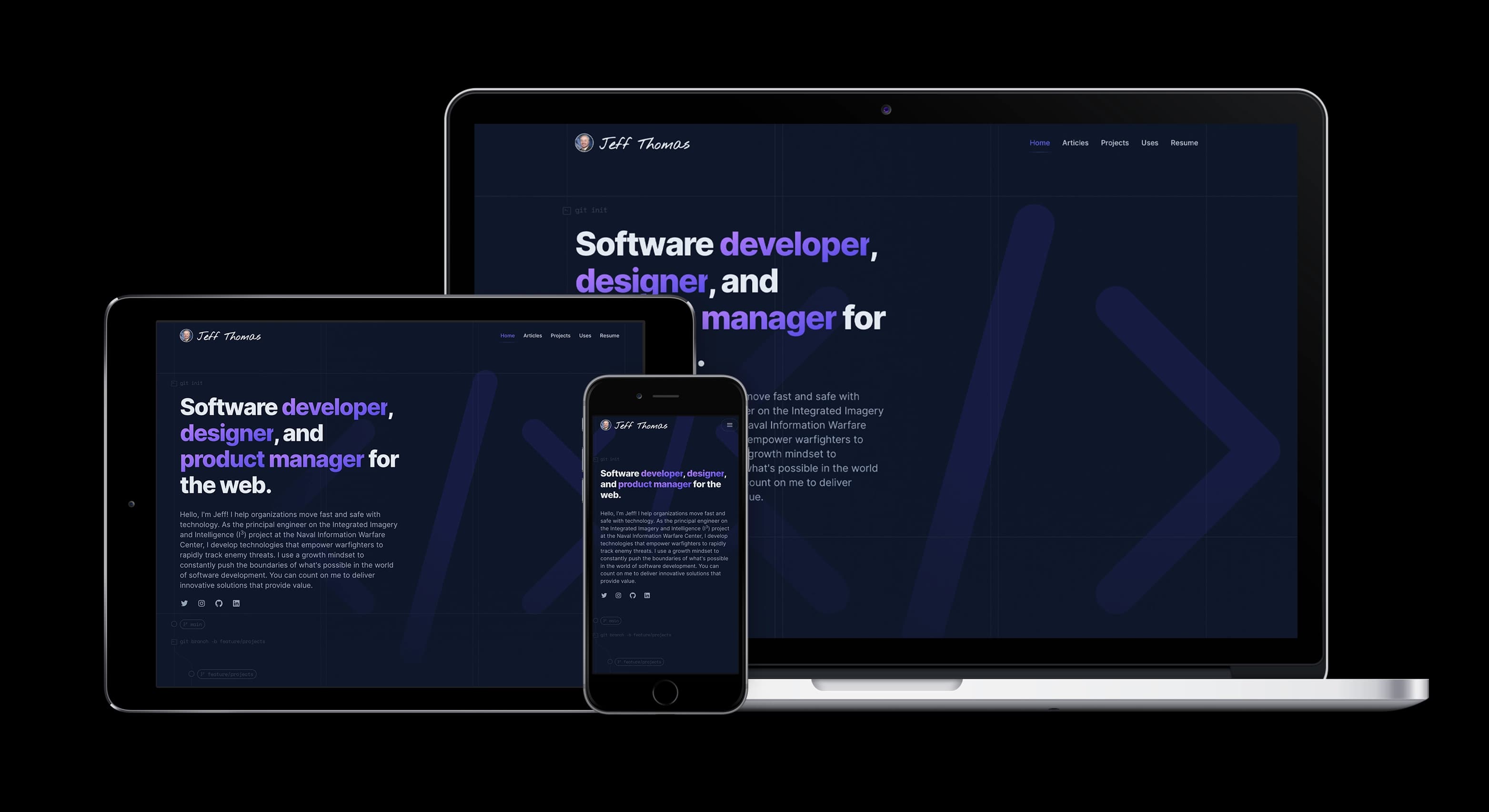
As someone who wears many hats, I wanted to create a website that represents all of my skills and experiences across various domains. This project, my very own personal portfolio website, is a culmination of my hard work and dedication in roles such as software development, design, product management, and defense intelligence subject matter expertise.
The site boasts a modern and intuitive design that is easy to navigate, with a user-friendly interface that showcases my diverse skill set and professional accomplishments. It is fully responsive, ensuring that users can view it on any device, from desktops to smartphones.
- Home: On the home page, you will find a brief introduction about me and what I do, as well as links to my projects, blog, uses page, and resume.
- Blog: The blog is where I share my thoughts on the latest web development trends, tips, and tutorials, providing value to my readers while also demonstrating my expertise in the field.
- Projects: The projects page showcases some of my recent work, complete with descriptions, screenshots, and links to live demos where applicable.
- Uses: The uses page is a list of all the tools, software, and hardware that I use to get my work done. This page not only gives visitors a glimpse into my workflow but also serves as a resource for those looking to improve their own productivity.
- Resume: Finally, the resume page provides a comprehensive overview of my skills, work experience, education, and achievements. Visitors can download a copy of my resume for their reference.
In addition to showcasing my diverse set of skills and experiences, another purpose for my personal portfolio website is to provide me with an opportunity to experiment with the latest technology and grow as a developer and designer. By continually pushing the boundaries of what I can do with the latest frameworks, libraries, and tools, I am able to stay up-to-date with the latest trends in the field of web development. This experimentation not only helps me improve my skills and abilities, but it also enables me to provide better solutions for my clients and users.
Ultimately, my personal portfolio website serves as a platform for me to challenge myself and continue to grow as a developer and is a reflection of my skills and passion for web development. I hope that you find it informative and engaging, and I welcome any feedback or comments you may have.
Location
If you would like to learn more about me and my diverse set of skills and experiences, please visit my personal portfolio website at https://www.jeffthomas.dev. If you are reading this, you are already here!
If the domain name jeffthomas.dev does not resonate with you, don't worry! There are other domain names mapped to my personal portfolio website that you can try instead like:
jeffthom.as,jeffthomas.ai,jeffthomas.codes,jeffthomas.design,jeffthomas.live,jeffthomas.me,jeffthomas.pm,jeffthomas.sh,jeffthomas.tech,- and
jeffthomas.wtf.
Product Management
During the development of my personal portfolio website, I utilized a task management app called Things on my Mac to track, plan, and break down features for the website. With Things, I was able to organize tasks and prioritize them based on their importance and complexity. This allowed me to stay focused and on track as I worked on the project.
I also reached out to a small group of individuals to get feedback on the website as I progressed through the development process. Their input helped me identify areas that needed improvement and allowed me to make necessary changes before the site was launched. By seeking feedback from a trusted group of individuals, I was able to ensure that my portfolio website was of the highest quality and would effectively showcase my skills and experiences.
In addition to using a task management app and seeking feedback from a small group, I also utilized my lean product management skills throughout the development process. I broke down the development of the site into small, manageable features, which allowed me to iterate quickly and make changes as necessary. I used data to inform my decisions and regularly reviewed analytics to track the site's performance. By applying lean principles, I was able to build a portfolio website that was both efficient and effective, ultimately resulting in a high-quality site that showcases my skills and experiences.
After launching my personal portfolio website, I plan to continually improve it based on increased data points. By regularly reviewing analytics and user feedback, I will be able to identify areas that can be improved and make necessary changes. This iterative approach will allow me to continuously optimize the site and ensure that it is providing the best possible experience for visitors. As I continue to gain new skills and experiences, I will also update the site to reflect these changes and showcase my latest work. My goal is to create a dynamic and evolving portfolio website that accurately reflects my skills and experiences as a developer.
Design
The design of my personal portfolio website was carefully crafted to showcase both my design skills and developer background. To emphasize my design skills, I used gridlines and a modern tech cyberpunk aesthetic, complete with purple to indigo gradient colors. These design elements were carefully chosen to provide a clean, modern look and feel that is both visually striking and professional.
To highlight my developer skills, I incorporated Git flows into the website, emphasizing my proficiency with Git version control and development workflows. This not only showcases my skills as a developer but also underscores my commitment to a collaborative and organized approach to project management.
During the ideation phase and iterative designing of my personal portfolio website, I utilized the Tailwind CSS framework to quickly and easily mock up prototypes of my design ideas. Most of my initial designs were low-fidelity napkin-like sketches, which I then refined into more detailed prototypes using the pre-defined Tailwind CSS classes. This approach allowed me to experiment with different layouts and design elements while maintaining a cohesive and professional appearance throughout the website. Overall, the flexibility and ease of use of the Tailwind CSS framework played a significant role in the ideation and iterative design process and allowed me to create a visually appealing and functional website efficiently.
To create a cohesive and modern color palette for my personal portfolio website, I utilized the Slate, Zinc, Purple, and Indigo color sets provided by the Tailwind CSS framework. These color palettes offer a range of muted grays, blues, and purples that complement the modern aesthetic of the website while maintaining a professional and polished appearance. By using these predefined color sets, I was able to ensure consistency throughout the website while also simplifying the color selection process. Overall, the Slate, Zinc, and Indigo color sets provided an excellent starting point for creating a visually appealing and professional color palette for my personal portfolio website.
Additionally, the website offers both light and dark mode capabilities, allowing users to customize the look and feel to their personal preference. The Inter font was used throughout the website to ensure a clean and modern typographic style. In general, the design of my personal portfolio website was intended to present my diverse skill set and experience in a visually engaging and professional manner.
Development
The architecture and technology used in my personal portfolio website were carefully selected to provide a fast, reliable, and modern user experience. These elements have been designed to offer the best possible performance and ensure a seamless user interaction for all visitors. In the following table, you will find a detailed breakdown of the technologies used to build my website from the front-end technologies that drive the user interface to the back-end infrastructure that powers it.
Tooling
| Area | Technology |
|---|---|
| CI/CD | Vercel Workflow |
| Conventional Commits | Commitlint |
| Git Hooks | Husky |
| IDE | VS Code |
| Monorepo | Turborepo |
| Package Manager | PNPM |
| Repository | Github |
| Static Analysis & Code Formatting | ESLint, Prettier |
| Testing (E2E) | Playwright |
| Testing (Unit) | Jest, ts-jest |
| UI Component Building | Storybook |
I utilized a range of development tooling to improve my workflow and ensure that my code was of the highest quality and a pleasure to develop.
- I used VS Code as my IDE, but everything was configured and coded in a way that didn't rely on any specific IDE.
- GitHub was used as the source code repository, and before any commits, Husky git hooks enforced that all tests, static analysis, and formatting passed. The commit message also adhered to the conventional commits.
- I've been adding and removing linting and formatting rules to my ESLint configs for some time, and I was able to pull them in and apply them to this project.
- I typically use npm and Yarn package managers, but I decided to use pnpm for this project and was pleasantly surprised at the performance gains.
- I utilized Turborepo for managing my monorepo project structure. Though I have used Yarn workspaces, Lerna, and Nx monorepos in the past, I wanted to try something new with Turborepo. It's a monorepo management tool that provides more out-of-the-box features than Yarn workspaces, while also being faster and more stable than Lerna. With Turborepo, I was able to separate my project into multiple packages and run scripts across them seamlessly. I was impressed by the ease of use and speed that it provided for setting up a monorepo structure. Additionally, Turborepo has great documentation and an active community that helped me resolve any issues I faced.
- Monorepos are something that I enjoy working with, and I was able to utilize them to separate and put boundaries between utility, UI, data, and feature libraries. I broke out Jest, TypeScript, and Tailwind configs into separate libraries, and even though apps and libs were separate, I could treat them as if they were one repo. Breaking common UI components into a separate lib allowed me to build and test them in isolation using Storybook.
- Lastly, I typically use Cypress for integration and E2E testing, but for this project, I decided to learn Playwright. This decision was due to the huge performance improvements provided by Playwright's parallel processing.
Site
| Area | Technology |
|---|---|
| Animations | Framer Motion |
| Asynchronous State Management | TanStack Query |
| Authentication | NextAuth |
| Charts | D3.js |
| Content | MDX, Contentlayer, Remark/Rehype |
| Forms | React Hook Form |
| Icons | HeroIcons, ReactIcons, Custom SVG |
| JavaScript Component Library | React |
| JavaScript Runtime | Node.js |
| Language | TypeScript |
| OG Image Generation | Vercel OG |
| React Framework | Next.js |
| SEO | Next.js Metadata, Next-Sitemap |
| Serverless Database Driver | Planetscale database-js |
| SQL Query Builder | Kysely |
| Styles | Tailwind CSS, Tailwind UI, CSS |
| Theming | Next-Themes |
| UI Components | HeadlessUI, Custom |
| Validation | Zod |
I chose to use Next.js as the React framework for the application code. The recent launch of Next.js v13 included several beta features and a completely revamped file-based router. Although I was cautious with bleeding-edge solutions, I decided to jump in and learn all the new features for learning purposes and to avoid a time consuming migration process later. These changes effectively altered the way app developers build Next.js apps, making it worth learning. I also took advantage of React Server Components (RSC) to improve performance by allowing the server to handle heavier tasks and the client-side to handle dynamic functions. This reminded me of coming full circle from server-side apps in PHP and Java to full client-side only apps with single-page apps, and then back to multi-page apps through client-side routing with the server doing the heavy lifting again. Goodbye loading indicators! This approach represents the future of React.
While RSCs are a powerful feature, their implementation requires a fundamental change in the way we think about building React applications. It may take some time for developers to fully embrace the idea of server-rendered components, especially in large-scale projects. However, as more developers begin to adopt and share their experiences with RSCs, we can expect to see more examples of best practices and patterns emerge in the community.
It's worth noting that while Next.js v13 beta features are exciting, they are still actively changing. Things within Next.js can break and third-party libraries are actively updating to meet the new ideas and concepts. Additionally, while React Server Components (RSC) show a lot of promise, there is still a ways to go within the community, especially with monorepos and third-party libraries. Nonetheless, utilizing these cutting-edge features helped me learn and stay up-to-date with the latest technologies, and I am excited to see where these advancements will take us in the future.
I chose to use TypeScript as my primary language for several reasons. Firstly, TypeScript is a statically typed language that provides type safety and enables more robust code. It helps catch errors earlier in the development process, reducing the time and effort needed for debugging. Secondly, TypeScript provides better editor support and tooling, which makes the development process more efficient and streamlined. Thirdly, TypeScript is a superset of JavaScript, meaning that it's backward-compatible with JavaScript and allows for seamless integration with existing JavaScript codebases. Finally, TypeScript has a large and growing community with many helpful resources available, including documentation, tutorials, and support. Overall, I found that using TypeScript made my development process more efficient and enjoyable, and it helped me to produce more robust and maintainable code.
Additionally, utilizing Tailwind, Headless UI, and icon libraries allowed me to move fast due to the constructs they brought along, making the development process even smoother.
Third-Party Services
| Area | Technology |
|---|---|
| Analytics | Vercel |
| Auth Social Logins | GitHub, Google, and LinkedIn |
| Database | Planetscale |
| Email Forwarding | ImprovMX |
| Hero Images | Unsplash |
| Newsletter | Buttondown |
| SEO | Bing Webmaster, Google Search Console, Yandex Webmaster |
I chose to use Vercel Analytics mainly to try out their new service and because it was easy to integrate with my existing hosting provider. While it's still maturing and not as full-featured as Google Analytics, I didn't need that much anyway, and Vercel met my needs. Additionally, Vercel Analytics provided some unique features, such as real-time metrics and alerts for specific events, that I found useful. Overall, I appreciated the simplicity and ease of use of Vercel Analytics, and while it may not be as comprehensive as other analytics solutions, it was more than sufficient for my project's needs.
In order to allow users to comment on blog posts, I implemented user authentication using Auth0's trial period. However, I found that the free tier did not include social logins and although Auth0 offered some configuration options, it did not allow full customization. As a result, I switched to using the NextAuth library, which supports integration with social providers such as Github, Google, and LinkedIn at no cost. With NextAuth, I was able to fully customize the authentication flows and provide a seamless user experience. This solution met all my requirements without incurring additional expenses and ultimately resulted in a better user experience.
Another user management and auth service I've been meaning to try is Clerk.dev, as it has a generous free tier of 5,000 monthly active users (MAUs). I decided to go with NextAuth for now as it meets my needs without any cost, though.
To enable persistent storage of data like views, likes, and comments, I explored various database services but ultimately chose Planetscale. I was impressed by its performance and the way they designed the developer experience to resemble traditional code development with git. Additionally, the generous free tier offered by Planetscale made it an attractive option.
Planetscale is a cloud-based database platform designed to help developers build scalable, reliable, and secure applications. It offers a distributed SQL database with a unique focus on making the development process more streamlined and efficient. Planetscale provides a Git-based workflow for database changes, which makes it easy to collaborate with other developers and manage database schema changes. The platform is built on top of Vitess, an open-source database clustering system that provides horizontal scaling, sharding, and fault tolerance.
UPDATE: March 11, 2024
After PlanetScale announced the end of their free hobby plan in a rather surprising move, coupled with tone deaf staff cuts and no affordable options for small-scale enthusiasts, I've decided to migrate my developer portfolio's database services. Luckily, my hosting with Vercel aligns perfectly with their recent introduction of databases supporting free hobby plans. As a result, I've switched to using Vercel Postgres using Neon, continuing with the Kysely ORM for seamless data management. The transition was smooth, thanks to the minimal size of my database.
To keep users informed about new blog posts and events, I decided to use a newsletter. However, I needed a service that would allow users to sign up and receive emails without leaving my site, while also maintaining a consistent look and feel. Although there were many popular services available, like Substack, they didn't meet my needs. After researching different options, I discovered Buttondown. Initially a passion project, it had evolved into a full email and newsletter service with an API. While they did offer a free tier, I needed the API to keep users on my site and maintain the look and feel, so I had to pay around $9 per month for API usage. Through using Buttondown, I also learned how to integrate Google email with MX records and custom domains to avoid looking like spam, while still utilizing an email with my domain name. Overall, Buttondown was an excellent choice for my newsletter needs, and I was able to customize the experience to match my site seamlessly.
ImprovMX offers a free email forwarding service that allows me to create and manage custom email addresses for my domain without the need for a separate email hosting service.
In order to improve the SEO of my portfolio website, I made an effort to create sitemaps and provide metadata for OG social links and crawlers. However, I also needed to inform the major search engines that I was the owner of the website domain, address any issues they identified with my site, and boost my SEO. To accomplish this, I registered as the webmaster with Google, Bing, and Yandex. This enabled me to verify ownership of my site and monitor its performance on search engines. Through this process, I was able to identify and resolve any issues that were affecting my site's SEO and ensure that it was being properly indexed by search engines. As a result, my portfolio became more visible on search engines, making it easier for users to find.
The DOD could benefit from having more managed services, such as authentication providers, user management, logging, auditing, and databases that aren't the core capability of app product teams. This would allow the teams to focus on their core mission value while rapidly integrating with existing robust services. By offloading the management of these services to specialized providers, app product teams could reduce the time and resources needed to build and maintain these capabilities in-house. This would allow them to focus on developing their core mission value and provide greater agility and flexibility to rapidly adapt to changing requirements. Overall, this approach could improve the efficiency and effectiveness of app development within the DOD.
Hosting
| Area | Technology |
|---|---|
| Architecture | Serverless |
| Host Provider | Vercel |
| Domain Registrar, DNS | Namecheap |
Vercel provided a comprehensive set of features that made it the perfect choice for hosting my personal portfolio website. One of the standout features was the seamless integration with Let's Encrypt, which made it easy to obtain SSL certificates for secure browsing. Vercel also offered additional DNS services, which was a valuable addition to the basic Namecheap service.
As the developer of Next.js, Vercel's Web framework, the decision to use their hosting platform was a no-brainer. Vercel's platform provided a frictionless and streamlined process for deploying my website. The platform offered integrated logging, secrets management, environment variable configuration, analytics, cron jobs, CI/CD git integration, and staging, preview, and production environments all in one place, making it a breeze to manage and deploy updates.
Vercel's environment reminded me of Heroku ten years ago, but with significant improvements. While Heroku was a game-changer in simplifying the deployment process, Vercel has taken it to the next level with their focus on performance and developer experience.
Overall, Vercel exceeded my expectations with their hosting services. Their platform provided a high level of abstraction, which allowed me to focus on developing my website rather than worrying about the underlying infrastructure. Vercel's robust features and user-friendly interface made it a pleasure to work with, and I highly recommend it to anyone looking for a reliable and efficient hosting solution (even if you're not using React and Next.js).
This should serve as a model for what the DOD needs to build and offer to product teams. While cloud services, Kubernetes, Docker, and other technologies are important stepping stones, they should not be the primary way that most web application product teams interact with the platform. Instead, we need to work towards higher levels of abstraction that enable developers to focus on their core mission and let the platform take care of the rest.
Performance
Performance is a critical aspect of any website, and I was diligent in ensuring that my personal portfolio website performed well for its visitors. I utilized various tools to test and optimize its performance, including Lighthouse and Vercel's Web Vitals. These tools helped me to identify potential performance bottlenecks and implement optimizations to improve loading times and overall site speed.
Lighthouse is an automated tool that measures a website's performance, accessibility, and best practices. It provided me with actionable insights into how to improve my website's performance. Vercel's Web Vitals is another tool that helped me to measure my website's core web vitals, such as load time, interactivity, and visual stability. These metrics are crucial to providing users with a seamless and enjoyable browsing experience.
The Web Vitals Real Experience score from Vercel represents the combined score of visitors' Web Vitals experience on your website. Based on pre-launch data points, my current score is performing well in the green, at 95.
In addition to the Web Vitals Real Experience score, there are three specific metrics that are tracked: First Contentful Paint, Largest Contentful Paint, and Cumulative Layout Shift. These metrics help measure the speed and visual stability of your website. Currently, my website's scores for these metrics are performing well. However, there are still areas that I would like to improve and iterate on to provide an even better user experience for my visitors.

To further optimize the website's performance, I used various techniques such as image optimization, code minification, and caching. Additionally, I used Vercel as my hosting platform, which provided me with high-speed global edge network to deliver my website's content to users as fast as possible.
The Vercel Edge Network enables you to store content close to your customers and run compute in regions close to your data, reducing latency and improving end-user performance. An Edge Network is both a CDN (Content Delivery Network) and a globally distributed platform for running compute at the edge.
Overall, I'm proud to say that my personal portfolio website performs exceptionally well, thanks to the optimization techniques and tools I utilized during its development.
Cost
One of the advantages of developing my personal portfolio website is that the cost has been relatively low. By taking advantage of free tier resources offered by third-party services, I have been able to keep the costs down. Most of the tools and services used to build and host the website are available for free with generous resource limits. The only out-of-pocket expense has been for the Buttondown newsletter service, which provides a free tier but doesn't offer the ability to customize the look and feel of the subscription form. To achieve that customization, I utilized Buttondown's APIs, which incur a cost of about $9 per month.
In addition to the Buttondown cost, I also pay a yearly fee for the domain names associated with the website through Namecheap. The cost can vary, but it's usually around $50 per year. Despite these costs, the overall expense of building and hosting the website has been very reasonable, thanks to the availability of free resources and the cost-effective choices I made along the way.
It's truly amazing that you can build a project for $0 and scale infinitely for a very affordable cost. For example, Vercel offers its first 1 million edge requests for free, and the next 1 million only cost $0.65. Planetscale provides MySQL for modern developers, and offers free service for up to 10 million row writes per month, 1 billion row reads per month, and 5 GB storage. With these kinds of services, it's possible to handle tens of thousands of users for only a few dollars a month.
Summary
My project was designed with a clean and minimalistic approach, incorporating the latest web design trends while maintaining user-friendliness and following Design Thinking practices along the way. In terms of product management, I utilized scaled down pieces of Agile development, DevOps practices, and Lean Startup methodologies to ensure alignment with project goals. For development, I used modern technologies such as React and Next.js, ensuring that the site is optimized for performance and scalability. And despite its high performance, the project has been built and scaled affordably, taking advantage of services like Vercel and Planetscale that offer generous free tiers and low-cost scaling options.
I am excited to continue growing this project with future content such as additional blog posts and updates on new projects. I believe that this site has the potential to serve as a valuable resource for both clients and fellow developers, and I look forward to expanding its capabilities and reach. With the foundations in place, I am confident that this project can continue to evolve and adapt to the ever-changing landscape of web development.
See the associated LinkedIn post announcing the launch of this site.
Comments
To leave feedback or questions, simply login using your preferred social network. I will read and answer your comments promptly, but please keep in mind that they will be public.